
Integration Patterns for Enterprise Applications
Overview
Integrating foundation models into enterprise applications requires careful architectural decisions around API design, event-driven patterns, microservices integration, and error handling. AWS provides multiple services that work together to build robust, scalable GenAI solutions.
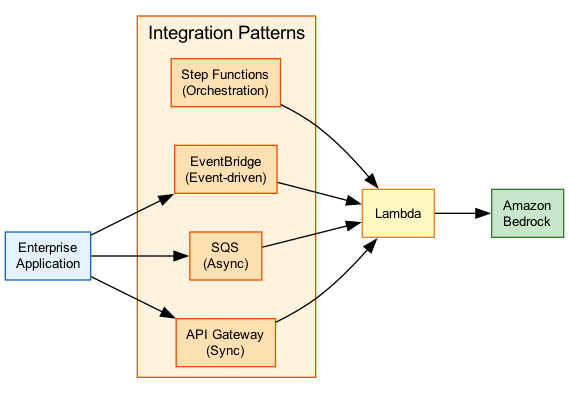
This topic covers the key integration patterns for connecting Amazon Bedrock to enterprise systems, including API Gateway for access control, Step Functions for orchestration, EventBridge for event-driven workflows, and SQS for asynchronous processing.
Key Principle
Enterprise GenAI integration is about building governance around model access - authorization, rate limiting, cost control, observability, and graceful error handling are essential for production systems.
Expect questions about when to use synchronous vs asynchronous patterns, how to handle errors and retries, and which AWS services to use for different integration scenarios. Know the Step Functions Bedrock integration actions.
Architecture Diagram
The following diagram illustrates common enterprise integration patterns with Amazon Bedrock:
Key Concepts
API-First Integration Approach
AI Gateway Pattern
API Gateway as the Access Layer:
Building an AI gateway with Amazon API Gateway provides enterprise governance:
Key Capabilities:
- Authorization - JWT validation, IAM, Cognito integration
- Rate Limiting - Usage plans and API keys
- Quota Management - Per-tenant limits
- Request Throttling - Protect backend from overload
- WAF Integration - Protection against attacks
- Canary Releases - Gradual rollout of changes
Architecture:
Client → API Gateway → Lambda → Bedrock
              ↓
         WAF, Auth, Throttling
Benefits:
- Centralized access control
- Cost allocation by tenant/API key
- Consistent logging and monitoring
- Decouples clients from Bedrock directly
API Types
API Gateway Options for GenAI:
REST APIs:
- Full feature set (throttling, caching, WAF)
- Higher latency than HTTP APIs
- Best for: Enterprise features, complex authorization
HTTP APIs:
- Lower latency, lower cost
- Limited features vs REST
- Best for: Performance-critical applications
WebSocket APIs:
- Bidirectional communication
- Persistent connections
- Best for: Streaming responses, chat applications
Private APIs:
- VPC-only access
- No internet exposure
- Best for: Internal applications, compliance
import boto3
import json

bedrock = boto3.client('bedrock-runtime')

def lambda_handler(event, context):
    # Extract user input from API Gateway event
    body = json.loads(event.get('body', '{}'))
    user_message = body.get('message', '')

    # Validate input
    if not user_message or len(user_message) > 10000:
        return {
            'statusCode': 400,
            'body': json.dumps({'error': 'Invalid input'})
        }

    try:
        # Invoke Bedrock with Converse API
        response = bedrock.converse(
            modelId='anthropic.claude-3-sonnet-20240229-v1:0',
            messages=[
                {'role': 'user', 'content': [{'text': user_message}]}
            ],
            inferenceConfig={'maxTokens': 1024}
        )

        output = response['output']['message']['content'][0]['text']

        return {
            'statusCode': 200,
            'body': json.dumps({'response': output})
        }

    except bedrock.exceptions.ThrottlingException:
        return {
            'statusCode': 429,
            'body': json.dumps({'error': 'Rate limit exceeded'})
        }
    except Exception as e:
        return {
            'statusCode': 500,
            'body': json.dumps({'error': 'Internal error'})
        }
Event-Driven GenAI Architectures
EventBridge Integration
Amazon EventBridge for GenAI Workflows:
Use Cases:
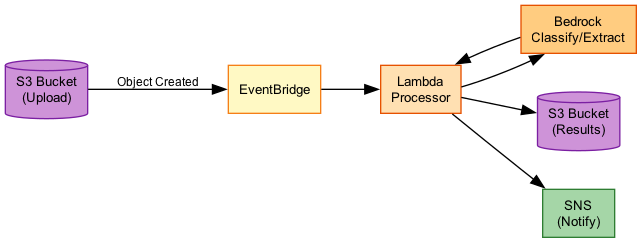
- Trigger GenAI processing on file uploads
- React to model inference completions
- Cross-account event routing
- Audit and compliance logging
Event Patterns:
{
  "source": ["aws.s3"],
  "detail-type": ["Object Created"],
  "detail": {
    "bucket": {"name": ["documents-bucket"]},
    "object": {"key": [{"prefix": "input/"}]}
  }
}
Architecture:
S3 Upload → EventBridge → Step Functions → Bedrock
                  ↓
              Archive (audit)
Benefits:
- Loose coupling between components
- Easy to add new consumers
- Built-in archive and replay
- Cross-account routing
Event-Driven Patterns
Common Event-Driven GenAI Patterns:
1. Document Processing Pipeline:
S3 → EventBridge → Step Functions
                        ↓
                   Textract → Bedrock → S3 Output
2. Real-Time Classification:
Kinesis → Lambda → Bedrock → DynamoDB
              ↓
         EventBridge (alerts)
3. Batch Inference Completion:
Bedrock Batch → EventBridge → Lambda → SNS
    (completed)              (notify)
4. Cross-Account AI Services:
Account A: Event → EventBridge (central bus)
                        ↓
Account B: → Step Functions → Bedrock
Microservices with FM Integration
Microservices Patterns
Integrating Bedrock into Microservices:
Service Mesh Pattern:
- Each microservice calls Bedrock independently
- Shared SDK configuration
- Distributed tracing with X-Ray
API Gateway Pattern:
- Central AI gateway service
- Other services call gateway
- Centralized governance
Sidecar Pattern:
- AI proxy container alongside service
- Handles model calls and caching
- Consistent across services
Best Practices:
- Isolate AI logic in dedicated service
- Use async patterns where possible
- Implement circuit breakers
- Cache responses when appropriate
Microservices Integration Patterns
| Pattern | Pros | Cons | Best For |
|---|---|---|---|
| Direct Integration | Simple, low latency | No centralized governance | Small teams, single service |
| API Gateway | Centralized control, governance | Additional hop, complexity | Enterprise, multi-team |
| Event-Driven | Loose coupling, scalable | Eventual consistency | Async workloads, pipelines |
| Sidecar | Consistent, portable | Resource overhead | Kubernetes, service mesh |
Legacy System Integration
Legacy Integration
Connecting GenAI to Legacy Systems:
Common Challenges:
- SOAP/XML APIs vs REST/JSON
- Synchronous blocking calls
- Limited scalability
- Security constraints
Integration Strategies:
1. API Facade:
Legacy → API Gateway → Lambda (transform) → Bedrock
- Transform SOAP to REST
- Handle authentication differences
- Abstract legacy complexity
2. Event Bridge:
Legacy → SQS → Lambda → Bedrock → SQS → Legacy
- Asynchronous decoupling
- Legacy polls for results
- No changes to legacy system
3. Database Integration:
Legacy → DB → Lambda (trigger) → Bedrock → DB
- DynamoDB Streams or RDS proxy
- Legacy reads results from DB
- Minimal integration surface
Error Handling and Fallback Strategies
Error Handling
Robust Error Handling for GenAI:
Common Bedrock Errors: | Error | Cause | Handling | |-------|-------|----------| | ThrottlingException | Rate limit exceeded | Exponential backoff | | ValidationException | Invalid input/parameters | Validate before sending | | ModelTimeoutException | Model took too long | Retry or use smaller model | | AccessDeniedException | IAM permission issue | Fix IAM policy | | ServiceUnavailableException | Bedrock unavailable | Retry with backoff |
Retry Strategy:
import time
from botocore.config import Config

config = Config(
    retries={
        'max_attempts': 3,
        'mode': 'adaptive'  # Exponential backoff
    }
)
bedrock = boto3.client('bedrock-runtime', config=config)
Fallback Strategies
Implementing Fallbacks:
1. Model Fallback:
Claude 3.5 Sonnet (primary)
    ↓ (failure)
Claude 3 Haiku (fallback)
    ↓ (failure)
Cached response or error
2. Regional Fallback:
us-east-1 (primary)
    ↓ (unavailable)
us-west-2 (secondary)
3. Graceful Degradation:
Full GenAI response (normal)
    ↓ (overloaded)
Cached similar response
    ↓ (no cache)
Static fallback message
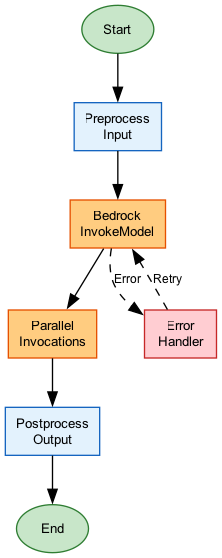
Implementation with Step Functions:
- Use Catch blocks for error handling
- Retry with exponential backoff
- Choice state for fallback routing
- Error notification via SNS
{
  "InvokeBedrock": {
    "Type": "Task",
    "Resource": "arn:aws:states:::bedrock:invokeModel",
    "Parameters": {
      "ModelId": "anthropic.claude-3-sonnet-20240229-v1:0",
      "Body": {
        "anthropic_version": "bedrock-2023-05-31",
        "messages": [{"role": "user", "content.$": "$.prompt"}],
        "max_tokens": 1024
      }
    },
    "Retry": [
      {
        "ErrorEquals": ["Bedrock.ThrottlingException"],
        "IntervalSeconds": 2,
        "MaxAttempts": 3,
        "BackoffRate": 2
      }
    ],
    "Catch": [
      {
        "ErrorEquals": ["States.ALL"],
        "Next": "FallbackModel"
      }
    ],
    "Next": "ProcessResponse"
  },
  "FallbackModel": {
    "Type": "Task",
    "Resource": "arn:aws:states:::bedrock:invokeModel",
    "Parameters": {
      "ModelId": "anthropic.claude-3-haiku-20240307-v1:0",
      "Body": {
        "anthropic_version": "bedrock-2023-05-31",
        "messages": [{"role": "user", "content.$": "$.prompt"}],
        "max_tokens": 512
      }
    },
    "Next": "ProcessResponse"
  }
}
How It Works
Step Functions Bedrock Integration
Event-Driven Document Processing
Use Cases
Use Case 1: Multi-Tenant AI Gateway
Scenario: SaaS platform providing AI capabilities to multiple customers with usage tracking.
Architecture:
Tenants → API Gateway → Lambda → Bedrock
              ↓
         Usage Plans (per tenant)
              ↓
         CloudWatch (cost allocation)
Implementation:
- API keys per tenant
- Usage plans with quotas
- Custom domain with WAF
- Per-tenant cost tagging
Benefits:
- Isolated rate limits per customer
- Cost allocation and billing
- Centralized security controls
- Easy to add new tenants
Use Case 2: Document Processing Pipeline
Scenario: Process uploaded documents with AI for classification and extraction.
Architecture:
S3 Upload → EventBridge → Step Functions
                              ↓
                         Textract (OCR)
                              ↓
                         Bedrock (classify)
                              ↓
                         Bedrock (extract)
                              ↓
                         DynamoDB (store)
                              ↓
                         SNS (notify)
Step Functions Benefits:
- Parallel processing (Distributed Map)
- Automatic retries on failure
- Visual workflow monitoring
- Native Bedrock integration
Use Case 3: Real-Time Chat with Fallbacks
Scenario: Customer chat application with high availability requirements.
Architecture:
WebSocket API → Lambda → Bedrock (us-east-1)
                    ↓ (failure)
                Bedrock (us-west-2)
                    ↓ (failure)
                Cached response
Implementation:
- Primary/secondary region routing
- Circuit breaker pattern
- Response caching for common queries
- Graceful degradation message
Best Practices
Enterprise Integration Best Practices
- Use API Gateway for governance - Centralize auth, rate limiting, and monitoring
- Implement retry with backoff - Handle ThrottlingException gracefully
- Design for failure - Include fallback models and graceful degradation
- Use async when possible - SQS/EventBridge for non-real-time workloads
- Leverage Step Functions - Native Bedrock integration with error handling
- Enable observability - X-Ray tracing, CloudWatch metrics, logging
- Isolate GenAI logic - Easier to update models and prompts
Common Exam Scenarios
Exam Scenarios and Solutions
| Scenario | Solution | Why |
|---|---|---|
| Need to process documents triggered by S3 upload | EventBridge + Step Functions + Bedrock | Event-driven, orchestrated workflow |
| Multi-tenant SaaS with usage limits | API Gateway with usage plans and API keys | Built-in rate limiting and quota management |
| High availability GenAI chat | Multi-region with Route 53 failover | Regional redundancy for availability |
| Long-running document batch processing | Step Functions Distributed Map + Bedrock | Parallel processing with state management |
| Legacy SOAP system needs AI capabilities | API Gateway + Lambda transformation layer | Transform SOAP to REST, abstract complexity |
Common Pitfalls
Pitfall 1: No Error Handling for Throttling
Mistake: Calling Bedrock without retry logic for rate limit errors.
Why it's wrong: ThrottlingException is common under load; failed requests hurt user experience.
Correct Approach:
- Implement exponential backoff retries
- Use adaptive retry mode in SDK
- Consider SQS to smooth traffic spikes
- Monitor throttling metrics
Pitfall 2: Synchronous Calls for Batch Processing
Mistake: Using synchronous API calls for processing thousands of documents.
Why it's wrong: Inefficient, expensive, and prone to timeouts.
Correct Approach:
- Use Bedrock batch inference (50% savings)
- Queue-based processing with SQS
- Step Functions Distributed Map for orchestration
- EventBridge for completion notifications
Pitfall 3: Direct Bedrock Access from Clients
Mistake: Exposing Bedrock credentials directly to client applications.
Why it's wrong: No governance, cost control, or security boundaries.
Correct Approach:
- Always proxy through API Gateway
- Use Cognito or IAM for authentication
- Implement rate limiting and quotas
- Log all requests for audit
Test Your Knowledge
A company wants to trigger AI processing whenever a document is uploaded to S3. What is the RECOMMENDED architecture?
An application is receiving ThrottlingException errors from Bedrock during peak usage. What is the BEST approach?
Which AWS service provides native integration for orchestrating multiple Bedrock calls with error handling and retries?
Related Services
Quick Reference
Integration Pattern Selection Guide
API Gateway + Lambda:
  - Real-time synchronous requests
  - Need auth, rate limiting, WAF
  - Multi-tenant with usage tracking

Step Functions + Bedrock:
  - Multi-step workflows
  - Need error handling and retries
  - Parallel processing (Distributed Map)
  - Long-running processes

EventBridge + Lambda:
  - Event-driven triggers (S3, etc.)
  - Cross-account routing
  - Audit and replay needs
  - Loose coupling required

SQS + Lambda:
  - Buffering against traffic spikes
  - Guaranteed message delivery
  - Fan-out to multiple processors
  - Async with retry/DLQ
Common Bedrock Error Codes
Bedrock Error Handling Reference
| Error | HTTP Code | Cause | Recommended Action |
|---|---|---|---|
| ThrottlingException | 429 | Rate limit exceeded | Exponential backoff retry |
| ValidationException | 400 | Invalid request | Fix input parameters |
| AccessDeniedException | 403 | IAM permission issue | Update IAM policy |
| ModelTimeoutException | 408 | Model too slow | Retry or use smaller model |
| ServiceUnavailableException | 503 | Service issue | Retry with backoff |