
Use Case Analysis and FM Selection Criteria
Overview
Selecting the right foundation model (FM) for your GenAI application is a strategic decision that impacts cost, performance, accuracy, and user experience. With Amazon Bedrock offering access to dozens of models from multiple providers, you need a systematic approach to narrow candidates and validate choices.
This topic covers the framework for matching models to business requirements, evaluating performance benchmarks, analyzing cost-capability tradeoffs, and considering regulatory requirements. For the AIP-C01 exam, understanding model selection criteria is essential for recommending appropriate solutions.
Key Principle
There is no universally "best" model - the optimal choice depends on your specific use case requirements, latency constraints, budget, and compliance needs. Model selection should be data-driven through evaluation and benchmarking.
Exam questions often present scenarios with specific requirements (latency, cost, capability) and ask which model to recommend. Know the strengths of each model family and how to match them to use cases.
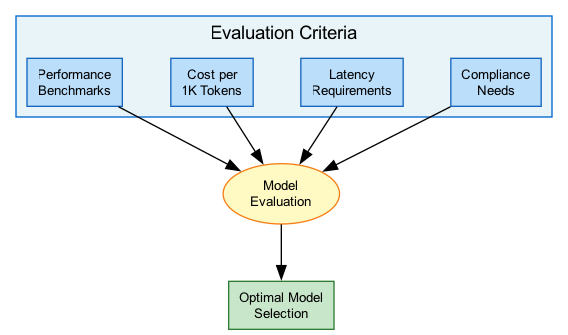
Architecture Diagram
The following diagram illustrates the model selection decision framework:
Key Concepts
Matching Models to Business Requirements
Requirements Analysis
Before evaluating models, define your requirements across these dimensions:
Functional Requirements:
- Primary task type (generation, classification, extraction)
- Input/output modalities (text, image, audio)
- Language support requirements
- Context length needs
- Output format requirements (structured JSON, prose)
Non-Functional Requirements:
- Latency targets (real-time vs batch)
- Throughput requirements (requests per minute)
- Availability requirements (SLA)
- Budget constraints (monthly spend)
Compliance Requirements:
- Data residency needs
- Industry regulations (HIPAA, PCI, SOC2)
- Content safety requirements
- Audit and logging needs
Model Filtering Process
AWS recommends a systematic filtering approach:
-
Hard Requirements Filter
- Use Bedrock Model Information API
- Filter by modality, context length, languages
- Exclude models below minimum thresholds
- Typically reduces candidates from dozens to 3-7 models
-
Capability Assessment
- Task-specific performance evaluation
- Benchmark against your actual use cases
- Consider fine-tuning requirements
-
Cost-Performance Analysis
- Calculate theoretical costs at projected scale
- Factor in provisioned vs on-demand pricing
- Account for token efficiency differences
-
Operational Fit
- Regional availability
- API compatibility requirements
- Support for needed features (streaming, tool use)
Model Selection Dimensions
| Dimension | Key Factors | Trade-off |
|---|---|---|
| Task Performance | Accuracy, relevance, fluency, coherence | Better performance often means higher cost/latency |
| Architecture | Context length, modality, parameter size | Larger models are more capable but slower |
| Operations | Latency, throughput, availability | Lower latency often requires provisioned capacity |
| Responsible AI | Safety, bias, hallucination rate | Stricter guardrails may limit creativity |
Performance Benchmarks Evaluation
Evaluation Metrics
Key Metrics for Model Evaluation:
Quality Metrics:
- Accuracy - Correctness of factual information
- Relevance - How well response addresses the query
- Fluency - Natural language quality
- Coherence - Logical consistency within response
- Hallucination Rate - Frequency of fabricated content
Performance Metrics:
- Time to First Token (TTFT) - Initial response latency
- Tokens per Second - Generation throughput
- P50/P90/P99 Latency - Response time distribution
Safety Metrics:
- Bias Detection - Fairness across demographics
- Toxicity Rate - Harmful content generation
- Refusal Accuracy - Appropriate handling of harmful requests
Amazon Bedrock Evaluations
Bedrock provides built-in evaluation capabilities:
Automatic Evaluation:
- Compare model outputs for brand voice, friendliness, relevance
- Assess RAG workflows for context relevance and correctness
- No additional cost for automated metrics
LLM-as-a-Judge:
- Use foundation models to evaluate other model outputs
- Custom evaluation criteria and prompts
- Evaluate for harmfulness, completeness, accuracy
Human Evaluation:
- Manual review for nuanced feedback
- $0.21 per completed human evaluation task
- Useful for subjective quality assessment
Custom Evaluation Pipelines:
- Integrate with Step Functions for automation
- Use Lambda for custom scoring logic
- Store results in S3/DynamoDB for analysis
Benchmark Best Practice
Never rely solely on public benchmarks. Model performance varies significantly by domain and task. Always evaluate with your actual data and use cases before selecting a model for production.
Cost-Capability Tradeoff Analysis
Cost Optimization Framework
Understanding Bedrock Pricing:
On-Demand Pricing:
- Pay per input/output token
- No upfront commitment
- Subject to shared capacity limits
- Best for: Variable workloads, experimentation
Batch Inference:
- Up to 50% cost savings
- Submit multiple prompts, retrieve from S3
- Best for: Large-scale processing, overnight jobs
Provisioned Throughput:
- Reserved capacity (model units)
- Fixed hourly cost
- Guaranteed performance
- Required for: Custom models, consistent latency needs
Cost Optimization Strategies
Strategies to Reduce Costs:
-
Intelligent Prompt Routing
- Route simple queries to smaller, cheaper models
- Reserve capable models for complex tasks
- Can reduce costs by up to 30% without accuracy loss
-
Model Distillation
- Transfer knowledge from large "teacher" to small "student"
- Student becomes performant for specific use cases
- Significant cost reduction at inference time
-
Token Efficiency
- Optimize prompt design to reduce token usage
- Use concise system prompts
- Implement response length limits
-
Caching
- Cache common responses
- Semantic similarity for cache hits
- Reduce redundant model calls
-
Right-Sizing
- Don't use Opus when Haiku suffices
- Benchmark smaller models first
- Scale up only when needed
Model Cost-Performance Tiers
| Tier | Models | Use Case | Relative Cost |
|---|---|---|---|
| Economy | Claude 3 Haiku, Llama 3 8B, Nova Lite | Simple tasks, high volume | $ (lowest) |
| Balanced | Claude 3.5 Sonnet, Llama 3 70B, Nova Pro | Most production workloads | $$ (medium) |
| Premium | Claude 3 Opus, Llama 3.1 405B | Complex reasoning, research | $$$ (highest) |
Regulatory and Compliance Requirements
Compliance Considerations
Industry-Specific Requirements:
Healthcare (HIPAA):
- PHI protection requirements
- Audit logging mandatory
- BAA required with AWS
- Consider on-premises options for sensitive data
Financial Services (PCI-DSS, SOX):
- PCI compliance for payment data
- Audit trails for regulatory reporting
- Data encryption requirements
- Consider Private Link/VPC endpoints
Government (FedRAMP):
- FedRAMP authorized regions only
- Data sovereignty requirements
- Specific model restrictions may apply
EU (GDPR, EU AI Act):
- Data residency in EU regions
- Right to explanation for AI decisions
- High-risk AI system classifications
- Transparency requirements
AWS Compliance Support
Bedrock Compliance Features:
- VPC Endpoints - Private connectivity, no internet exposure
- KMS Encryption - Customer-managed keys for data at rest
- CloudTrail Logging - Complete API audit trail
- Model Invocation Logging - Optional input/output logging
- Data Processing - Models don't store customer data
- Regional Availability - Deploy in compliant regions
- AWS Artifact - Compliance reports and certifications
Model Availability and Support
Model Availability
Factors Affecting Availability:
Regional Availability:
- Not all models available in all regions
- Check region support before design
- Plan for multi-region if needed
Model Lifecycle:
- Models have versioning (v1, v2, etc.)
- Older versions may be deprecated
- Plan for migration/testing new versions
Access Requirements:
- Some models require access request
- Anthropic models may need use case details
- Enterprise agreements for some providers
Provisioned Throughput:
- Must be available for your region
- Commitment terms (1 month, 6 months)
- Limited capacity - plan ahead
Model Availability by Region (Sample)
| Model Family | US East (N. Virginia) | US West (Oregon) | EU (Frankfurt) | AP (Tokyo) |
|---|---|---|---|---|
| Claude 3 Family | Yes | Yes | Yes | Yes |
| Llama 3 Family | Yes | Yes | Yes | Yes |
| Amazon Nova | Yes | Yes | Yes | Yes |
| Mistral | Yes | Yes | Yes | Limited |
| Cohere | Yes | Yes | Limited | Limited |
How It Works
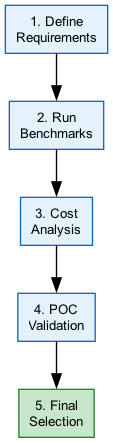
Model Selection Decision Flow
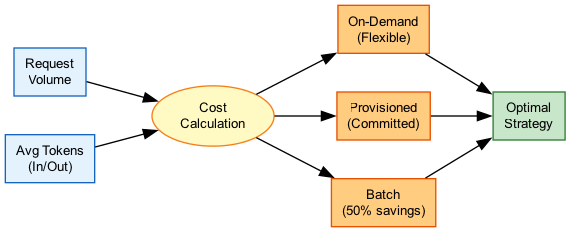
Cost Analysis Workflow
Use Cases
Use Case 1: Customer Service Chatbot
Scenario: Build a customer support chatbot with real-time responses, FAQ handling, and escalation for complex issues.
Requirements Analysis:
- Latency: <1 second TTFT
- Volume: 10,000 queries/day
- Languages: English, Spanish
- Integration: Knowledge base for FAQ
- Budget: Cost-conscious
Model Selection Process:
- Filter: Exclude models with >2s latency
- Candidates: Claude 3 Haiku, Llama 3 8B, Nova Lite
- Evaluate: Test with sample customer queries
- Cost analysis: Calculate monthly spend at volume
Recommendation: Claude 3 Haiku
- Excellent speed for real-time interaction
- Strong reasoning for query understanding
- Good empathy in responses
- Cost-effective for high volume
Use Case 2: Legal Document Analysis
Scenario: Analyze 200-page contracts for clause extraction and risk identification.
Requirements Analysis:
- Context: 150K+ tokens per document
- Accuracy: High (legal implications)
- Latency: Batch acceptable (not real-time)
- Compliance: Sensitive legal data
Model Selection Process:
- Filter: Exclude models with <200K context
- Candidates: Claude 3.5 Sonnet, Nova Pro
- Evaluate: Test clause extraction accuracy
- Compliance: VPC endpoint, encryption
Recommendation: Claude 3.5 Sonnet
- 200K context window fits full documents
- Strong reasoning for complex legal language
- High accuracy for extraction tasks
- Use batch inference for cost savings
Use Case 3: Multi-Language Content Generation
Scenario: Generate marketing content in 10+ languages for global campaign.
Requirements Analysis:
- Languages: 12 languages including Asian
- Quality: Native-level fluency
- Volume: 5,000 pieces/month
- Brand: Consistent voice across languages
Model Selection Process:
- Filter: Strong multilingual support required
- Candidates: Mistral Large, Claude 3.5, Llama 3
- Evaluate: Native speaker review per language
- Cost: Balance quality vs volume
Recommendation: Mistral Large
- Excellent multilingual capabilities
- Strong non-English language support
- Competitive pricing for volume
- Consider Claude for quality-critical content
Best Practices
Model Selection Best Practices
- Start with requirements - Define hard constraints before evaluating models
- Benchmark with real data - Don't rely on public benchmarks alone
- Use Bedrock Evaluations - Leverage built-in tools for comparison
- Consider total cost - Include development, optimization, and operational costs
- Plan for fallbacks - Design multi-model architectures for resilience
- Monitor in production - Continuously evaluate quality and cost metrics
- Stay current - New models launch frequently; re-evaluate periodically
Common Exam Scenarios
Exam Scenarios and Solutions
| Scenario | Key Factor | Recommended Approach |
|---|---|---|
| Real-time chat with <500ms latency | Latency constraint | Claude 3 Haiku or Llama 3 8B |
| Process 100-page documents | Context window | Claude 3.5 Sonnet or Nova Pro (200K+) |
| Cost-sensitive batch processing | Cost optimization | Smaller model + batch inference (50% savings) |
| Healthcare application with PHI | HIPAA compliance | VPC endpoints, encryption, audit logging |
| Variable complexity queries | Mixed workload | Intelligent prompt routing to multiple models |
| EU data residency requirement | Compliance | Deploy in EU region with compliant models |
Common Pitfalls
Pitfall 1: Choosing Based on Public Benchmarks Only
Mistake: Selecting a model because it ranks highest on public benchmarks.
Why it's wrong: Benchmarks test generic capabilities; your use case may differ significantly.
Correct Approach:
- Use benchmarks for initial filtering only
- Always evaluate with your actual data and prompts
- Conduct A/B testing with real users when possible
- Use Bedrock Evaluations for systematic comparison
Pitfall 2: Ignoring Total Cost of Ownership
Mistake: Focusing only on per-token pricing when comparing models.
Why it's wrong: Token efficiency, prompt optimization costs, and operational overhead vary.
Correct Approach:
- Calculate cost at projected scale and volume
- Factor in prompt engineering effort per model
- Consider provisioned vs on-demand based on patterns
- Include monitoring and optimization costs
Pitfall 3: Over-Engineering for Future Requirements
Mistake: Selecting the largest, most capable model "just in case."
Why it's wrong: Wastes budget, increases latency, and delays deployment.
Correct Approach:
- Start with the smallest model that meets current needs
- Implement model routing for upgrade path
- Design architecture to swap models easily
- Scale up based on measured needs
Test Your Knowledge
A company needs to build a chatbot with sub-second response times and handle 50,000 queries daily. Which approach should they take for model selection?
What is the PRIMARY benefit of Amazon Bedrock's Intelligent Prompt Routing feature?
An organization must process sensitive healthcare data with PHI. What model selection consideration is MOST important?
Related Services
Quick Reference
Model Selection Checklist
□ Define functional requirements (task, modality, languages)
□ Define non-functional requirements (latency, throughput, budget)
□ Identify compliance requirements (HIPAA, GDPR, etc.)
□ Filter models using Bedrock Model Information API
□ Shortlist 3-7 candidate models
□ Evaluate with actual data using Bedrock Evaluations
□ Calculate costs at projected scale
□ Verify regional availability
□ Test integration and API compatibility
□ Document selection rationale for audit
Cost Optimization Strategies
Cost Reduction Strategies
| Strategy | Savings Potential | Best For |
|---|---|---|
| Batch inference | Up to 50% | Non-real-time bulk processing |
| Intelligent routing | Up to 30% | Mixed complexity workloads |
| Model distillation | 40-70% | Specific use cases at scale |
| Prompt optimization | 10-30% | All workloads |
| Response caching | Variable | Repetitive queries |