
![CCA-F Exam Domains: Complete Breakdown & Weight Distribution [2026]](/blog/cca-f-exam-domains-complete-breakdown-2026.webp)
The Claude Certified Architect - Foundations (CCA-F) exam tests five distinct competency domains, each carrying different weight in your final score. Understanding these domains and their relative importance is the foundation of any effective study plan. Whether you are allocating study hours across a 30-day sprint or deciding which topics deserve a second pass the night before, the domain breakdown tells you exactly where your points live.
This guide dissects every domain in detail: the exact weight percentages, approximate question counts, core concepts you must internalize, anti-patterns the exam loves to test, and the sample scenario themes that appear most frequently. By the time you finish reading, you will know precisely what the CCA-F exam expects and how to prioritize your preparation accordingly.
What this guide covers:
- Complete weight breakdown for all 5 domains with approximate question counts
- Core concepts, key terminology, and critical distinctions for each domain
- Anti-patterns and common exam traps that catch unprepared candidates
- Sample scenario question themes so you know what to expect
- A study priority matrix that accounts for both weight and difficulty
- Cross-domain connections that help you answer synthesis questions
- A comprehensive mastery checklist to track your preparation progress
If you are already familiar with the CCA-F exam structure from our exam format guide, this article goes deeper into the actual content of each domain. While the format guide tells you how the exam works, this guide tells you what the exam tests.
Find out where you stand first
Take the free CCA-F sample questions cold (no signup, real exam style), then read on with your gaps in mind. When you are ready for full rehearsal, Preporato's CCA-F practice tests include 6 full-length exams (390 questions in total, domain-proportional, every answer explained) for a one-time $19.99 with lifetime access.
Start Here
New to CCA-F? Begin with our Complete CCA-F Certification Guide for an overview of the exam, eligibility, and study paths. Then grab the CCA-F Cheat Sheet for quick reference and read How to Pass CCA-F on Your First Attempt for proven exam strategies.
June 2026 Model Note
Anthropic released Claude Fable 5 on June 9, 2026: a new model tier above Opus with a 1M-token context window and a classifier safeguard layer that falls back to Opus 4.8 on flagged high-risk requests. The domain breakdown below reflects the current blueprint, which was written against the Opus 4.8 / Sonnet 4.6 / Haiku 4.5 lineup. Expect Fable 5 to enter scenario questions only after a blueprint refresh, and keep anchoring cost-tier and capability-tier reasoning to the documented production models.
Domain Weight Overview
The CCA-F exam consists of 60 questions spread across five domains. Each domain carries a specific percentage weight, which directly determines how many questions you will see from that topic area. Here is the complete breakdown:
CCA-F Exam Domain Weights
| Domain | Weight | ~Questions (out of 60) | Primary Focus |
|---|---|---|---|
| Domain 1: Agentic Architecture & Orchestration | 27% | ~16 | Agentic loops, multi-agent patterns, escalation |
| Domain 2: Tool Design & MCP Integration | 18% | ~11 | Tool descriptions, MCP config, error handling |
| Domain 3: Claude Code Configuration & Workflows | 20% | ~12 | CLAUDE.md hierarchy, skills, CI/CD integration |
| Domain 4: Prompt Engineering & Structured Output | 20% | ~12 | Few-shot prompting, validation loops, Batch API |
| Domain 5: Context Management & Reliability | 15% | ~9 | Lost-in-the-middle, escalation, crash recovery |
The Numbers That Matter
Two domains dominate the exam. Agentic Architecture & Orchestration (Domain 1) and Claude Code Configuration & Workflows (Domain 3) together account for 47% of all questions. That is roughly 28 out of 60 questions coming from just these two areas. If you are short on time, these are where you invest first.
But do not neglect the remaining three domains. Tool Design & MCP Integration (Domain 2) and Prompt Engineering & Structured Output (Domain 4) each carry 18-20%, meaning approximately 11-12 questions apiece. Even Context Management & Reliability (Domain 5) at 15% still represents 9 questions that could make or break your passing score.
Study Time Allocation Should Match Weights
A common mistake is spending equal time on all five domains. Instead, allocate your study hours proportionally:
- Domain 1 (Agentic Architecture): 27% of study time - highest priority
- Domain 3 (Claude Code): 20% of study time - second priority
- Domain 4 (Prompt Engineering): 20% of study time - third priority
- Domain 2 (Tool Design & MCP): 18% of study time - fourth priority
- Domain 5 (Context Management): 15% of study time - fifth priority
Adjust upward for domains where you have less experience, and downward for areas where you already work daily.
Understanding the Question Distribution
The approximate question counts above are based on applying each domain's weight percentage to the 60-question total. In practice, the exact number may vary by 1-2 questions between exam versions, but the proportions remain consistent. This means:
- You will see roughly 28 questions from Domains 1 and 3 combined (Agentic Architecture + Claude Code)
- You will see roughly 23 questions from Domains 2 and 4 combined (Tool Design + Prompt Engineering)
- You will see roughly 9 questions from Domain 5 (Context Management)
The practical implication is clear: if you master Domains 1 and 3 perfectly but struggle with the rest, you can still answer nearly half the exam with confidence. Conversely, if you neglect Domains 1 and 3, you are fighting an uphill battle from the start.
Each domain section below covers the complete set of topics you need to know, organized by subtopic with explicit callouts for the highest-frequency exam themes. Read them in order for the first pass, then revisit your weakest domains for focused review.
Preparing for CCA-F? Practice with 390+ exam questions
Domain 1: Agentic Architecture & Orchestration (27%)
Approximate question count: ~16 questions
This is the single heaviest domain on the CCA-F exam, and for good reason. Agentic architecture is the defining capability that separates Claude-powered applications from simple chatbots. The exam tests whether you can design, control, and debug autonomous agent systems that make decisions, call tools, coordinate with other agents, and know when to stop.
Expect questions that present real-world scenarios and ask you to identify the correct architectural pattern, diagnose a broken agentic loop, or choose the right escalation strategy. This domain rewards deep understanding of how agents actually work at the implementation level, not just theoretical knowledge.

Core Concepts
The foundation of Domain 1 is the agentic loop and how Claude operates within it. You must understand the complete lifecycle of an agentic interaction.
Agentic Loop Control is the single most important concept in this domain. The loop operates on a simple but critical mechanism:
- When
stop_reason="tool_use", the agent has requested a tool call. Your orchestrator should execute the tool and continue the loop by appending the tool result to the conversation history. - When
stop_reason="end_turn", the agent has determined its task is complete. Your orchestrator should terminate the loop and return the final response. - Between iterations, you must append tool results to the conversation history. The model needs to see what happened when it called a tool in order to decide what to do next.
This is the programmatic enforcement pattern that the exam tests repeatedly. The agent does not decide when to stop by generating text like "I'm done now." It signals completion through the structured stop_reason field, and your code acts on that signal deterministically.
Hub-and-Spoke Pattern is the primary multi-agent architecture tested on the CCA-F. In this pattern:
- A coordinator agent manages ALL communication between subagents
- Subagents have isolated context and do not communicate directly with each other
- The coordinator decides which subagent to invoke, what information to pass, and how to synthesize results
- This isolation is intentional: it prevents context pollution and makes the system easier to debug and reason about
Context Passing Between Agents is a critical subtlety that the exam tests explicitly. In the hub-and-spoke model:
- Subagents do NOT inherit the coordinator's conversation history
- If a subagent needs information from a previous subagent's findings, the coordinator must pass those findings explicitly in the subagent's prompt
- This means the coordinator is responsible for summarizing and routing relevant context
- Failing to pass context explicitly is one of the most common architectural mistakes in multi-agent systems
Parallel Execution is tested in the context of multi-agent coordination:
- A coordinator can emit multiple Task calls in a single response, triggering parallel subagent execution
- This is appropriate when subtasks are independent and do not depend on each other's results
- The coordinator collects all results and synthesizes them in the next turn
- Questions may ask you to identify which tasks can safely run in parallel versus which require sequential execution
Dependency Detection is the key skill for parallel execution questions. Two tasks can run in parallel if and only if neither task's output is required as input for the other task. If SubAgent A performs code review and SubAgent B performs test generation for the reviewed code, these are sequential: B depends on A's output. If SubAgent A reviews frontend code and SubAgent B reviews backend code independently, these can run in parallel.
The exam often presents four subtasks and asks which ones can be parallelized. Map the dependencies first, then group independent tasks together.
Conversation History Management
Understanding how conversation history works within the agentic loop is tested at a granular level:
- Each message in the conversation has a role (user, assistant, tool) and content
- Tool results must be appended with the correct role and format for the model to process them
- The conversation history is the model's only memory of what has happened. If a tool result is not appended to the history, the model has no knowledge of it
- Truncating conversation history to save tokens requires careful selection of what to keep. Removing tool results from early in the conversation means the model cannot reference those findings later.
This connects to Domain 5's context management concepts. The conversation history is both the model's memory and its primary vulnerability as it grows.
Session Management
The CCA-F tests your knowledge of how Claude Code manages sessions, particularly in long-running or branching workflows:
--resume <session-name>continues a specific prior session, restoring the conversation history and context from where you left offfork_sessioncreates an independent branch from a shared baseline, allowing parallel exploration of different approaches without contaminating the original session- Know when to use each:
--resumeis for continuing work,fork_sessionis for exploring alternatives
Session naming conventions matter for team workflows. A descriptive session name like refactor-auth-module is far more useful than an auto-generated ID when you need to resume work days later or when multiple team members are working on related tasks. The exam may present a scenario where a developer cannot find a previous session and ask for the best practice.
Session isolation is a key property: forked sessions are fully independent. Changes made in a forked session do not affect the parent session. This allows safe experimentation without risk to the main line of work.
Anti-Patterns to Know
Anti-Patterns the Exam Loves to Test
The CCA-F frequently presents anti-patterns disguised as reasonable solutions. Watch for these traps:
- Parsing natural language to detect loop termination: Never check if the model said "I'm finished" or "task complete" to decide whether to stop the loop. Use
stop_reasonprogrammatically. Natural language is ambiguous and unreliable for control flow. - Arbitrary iteration caps as the primary stopping mechanism: Setting
max_iterations=5and hoping the agent finishes in time is not a valid architecture. Iteration caps are safety nets, not control flow. The primary mechanism should always bestop_reason. - Overly narrow task decomposition: Breaking a task into too many tiny subtasks leads to incomplete coverage because each subagent has minimal context. A subagent that only looks at one function cannot identify cross-function issues.
If a question presents one of these patterns as a solution, it is almost certainly the wrong answer.
Escalation Patterns
Escalation is a critical topic that bridges Domains 1 and 5. The exam tests whether you know when an agent should hand off to a human:
When to escalate:
- The customer explicitly requests a human agent
- Policy is ambiguous and the agent cannot determine the correct action with confidence
- The agent has attempted multiple approaches and cannot make progress toward the goal
- The situation involves edge cases not covered by the agent's instructions or tools
When NOT to escalate:
- Based on sentiment alone. A frustrated customer is not necessarily a complex case. Frustration does not equal complexity, and escalating every upset customer defeats the purpose of the agent.
- Based on self-reported confidence scores. The model's own assessment of its confidence is poorly calibrated. An agent saying "I'm 60% confident" does not reliably indicate when escalation is needed.
This distinction between sentiment-based and complexity-based escalation is a favorite exam topic. Multiple questions may test this concept from different angles.
The Critical Mental Model: Programmatic Enforcement vs. Prompt-Based Guidance
This is perhaps the single most important conceptual distinction in the entire CCA-F exam, and it appears across multiple domains. The core principle:
When errors have financial, legal, or safety consequences, prompts are probabilistic and insufficient. Use programmatic enforcement.
Prompts are powerful, but they are suggestions. A prompt that says "never transfer more than $10,000" will work most of the time, but "most of the time" is not acceptable for financial transactions. For these cases, you need:
- Hooks: Pre-execution checks that run before a tool call is completed
- Prerequisite gates: Hard requirements that must be satisfied before an action can proceed
- Tool-call interceptors: Middleware that validates tool parameters against business rules before execution
The exam tests this through scenarios where candidates must choose between a prompt-based solution and a programmatic solution. The prompt-based solution always sounds reasonable but is wrong when the stakes are high.
Example mental model: If the consequence of failure is "the user gets a slightly wrong answer," prompts are fine. If the consequence of failure is "the company loses $50,000," use programmatic enforcement.
The spectrum of enforcement mechanisms:
| Mechanism | Reliability | Use Case | Example |
|---|---|---|---|
| System prompt instructions | Probabilistic (~95-99%) | Low-stakes guidance | "Respond in a friendly tone" |
| Hooks (pre-execution) | Deterministic (100%) | Financial/safety gates | Validate transfer amount before executing |
| Prerequisite gates | Deterministic (100%) | Multi-step workflows | Require manager approval before claim processing |
| Tool-call interceptors | Deterministic (100%) | Parameter validation | Reject API calls with invalid parameters |
The exam does not expect you to build these mechanisms from scratch, but you must know when each is appropriate and why prompt-based solutions fail for high-stakes scenarios.
Guardrails vs. Guidelines
A related concept that bridges this domain with Domain 4: guardrails are hard constraints enforced programmatically, while guidelines are soft preferences expressed through prompts. The CCA-F tests whether you can correctly classify a given requirement as needing a guardrail or a guideline.
Guardrails (programmatic):
- Maximum transaction amounts
- Prohibited actions (deleting production data)
- Required approvals before irreversible operations
- Rate limiting on sensitive operations
Guidelines (prompt-based):
- Response tone and style preferences
- Level of detail in explanations
- Formatting conventions
- When to ask clarifying questions vs. proceeding with assumptions
The key insight: if a requirement uses words like "must never," "always required," or "prohibited," it likely needs a guardrail. If it uses words like "prefer," "ideally," or "when appropriate," a guideline is sufficient.
Sample Scenario Questions
Expect question themes like these in Domain 1:
Scenario 1 - Loop Control: "An agentic system processes customer refund requests. After calling the refund tool, the agent sometimes continues to loop instead of terminating. Which approach most reliably prevents infinite loops?"
- The correct answer involves checking
stop_reason, not parsing the agent's text output or setting arbitrary iteration limits.
Scenario 2 - Multi-Agent Context: "A coordinator agent dispatches a code review task to SubAgent A and a test generation task to SubAgent B. SubAgent B needs to know which files SubAgent A flagged as problematic. What is the correct approach?"
- The correct answer involves the coordinator explicitly passing SubAgent A's findings in SubAgent B's prompt, not having SubAgent B access SubAgent A's context directly.
Scenario 3 - Escalation: "A customer support agent detects high negative sentiment in a conversation about a billing error. The agent has the tools and authority to resolve billing errors. Should the agent escalate?"
- The correct answer is no. Sentiment alone does not trigger escalation. The agent has the capability to resolve the issue and should proceed.
Scenario 4 - Programmatic vs. Prompt: "An agent processes insurance claims. The system prompt instructs the agent to never approve claims over $100,000 without manager review. How should this constraint be implemented?"
- The correct answer involves a programmatic gate on the approval tool, not relying on the system prompt instruction.
Scenario 5 - Parallel vs. Sequential: "A coordinator must: (A) check inventory levels, (B) calculate shipping costs, (C) verify payment method, and (D) generate order confirmation. Task D requires results from A, B, and C. Which tasks can run in parallel?"
- Tasks A, B, and C are independent of each other and can run in parallel. Task D depends on all three and must run after they complete. The coordinator emits three parallel Task calls, collects results, then dispatches Task D.
Scenario 6 - Session Management: "A developer is debugging an authentication issue. After making progress with one approach, they want to try an alternative approach without losing the progress from the first. What should they do?"
- Use
fork_sessionto create an independent branch. The fork preserves the current state as a baseline, and the developer can explore the alternative approach without affecting the original session. If the alternative approach fails, they can return to the original session with--resume.
Domain 1 Key Terminology Quick Reference
| Term | Definition | Exam Relevance |
|---|---|---|
| stop_reason | Structured field indicating why the model stopped generating | Primary loop control mechanism |
| Hub-and-spoke | Coordinator + isolated subagents pattern | Most tested multi-agent architecture |
| Context isolation | Subagents do not inherit parent context | Tested as an anti-pattern when violated |
| Programmatic enforcement | Hard constraints via code, not prompts | Highest-stakes design principle |
| Escalation trigger | Condition requiring human handoff | Complexity-based, not sentiment-based |
| fork_session | Create independent branch from current state | Tested in session management scenarios |
Domain 2: Tool Design & MCP Integration (18%)
Approximate question count: ~11 questions
Domain 2 tests your ability to design effective tools, configure the Model Context Protocol (MCP), handle errors gracefully, and understand how Claude selects and uses tools. This domain is deeply practical and tests implementation-level knowledge about tool descriptions, distribution strategies, configuration files, and error response patterns.
The exam assumes you understand that tools are the primary mechanism through which Claude agents interact with external systems. How you design, describe, distribute, and configure those tools directly determines whether your agent succeeds or fails.
Tool Description Best Practices
This is one of the highest-yield topics in Domain 2. The exam tests a critical insight that many candidates miss:
Tool descriptions are the PRIMARY mechanism for tool selection.
Not the function name. Not the system prompt. The description field on each tool is what Claude reads to decide which tool to call and when. This means your tool descriptions must be comprehensive and precise:
- Include input formats: Specify exactly what format each parameter expects (ISO date strings, email addresses, JSON objects)
- Include example queries: Show what a typical invocation looks like so the model understands the intended use
- Include edge cases: Document what happens with empty inputs, null values, or boundary conditions
- Include explicit boundaries vs. similar tools: If you have both
search_customersandlookup_customer_by_id, the descriptions must clearly explain when to use each one
A vague description like "Searches for customers" forces the model to guess. A precise description like "Searches for customers by name, email, or phone number. Use this for fuzzy matching when the caller provides partial information. For exact lookups by customer ID, use lookup_customer_by_id instead" eliminates ambiguity.
The description hierarchy of importance:
- What the tool does (primary purpose)
- What input format it expects (parameter specifications)
- When to use it vs. similar tools (disambiguation)
- What it returns (output format and content)
- Edge cases and limitations (boundary conditions)
If you can only improve one aspect of a tool that is being incorrectly selected, improve the disambiguation section (point 3). The most common selection errors occur when the model cannot distinguish between two similar tools, not when it misunderstands what a single tool does.
Common description anti-patterns:
- Descriptions that repeat the function name without adding information ("get_user: Gets a user")
- Descriptions that omit input format ("Takes a query and returns results" -- what kind of query?)
- Descriptions that do not mention related tools ("Searches the database" -- but which database, and when should I use the other search tool instead?)
The exam will present scenarios where an agent calls the wrong tool and ask you to identify the fix. The answer is almost always improving the tool description, not changing the system prompt or the function name.
Tool Distribution
The number of tools available to an agent directly affects selection reliability:
- 4-5 tools per agent is the optimal range for reliable tool selection
- As tool count increases, the model must discriminate between more options, increasing the chance of incorrect selection
- 18+ tools significantly degrades selection reliability, even with excellent descriptions
- When you need more than 18 tools, split them across multiple specialized subagents using the hub-and-spoke pattern from Domain 1
This connects directly to the multi-agent architecture concepts in Domain 1. The exam may present a scenario where an agent with 25 tools is making poor selections and ask for the best fix. The answer is to decompose into subagents with focused tool sets, not to write longer descriptions or add more system prompt instructions.
Tool count guidelines by agent type:
| Agent Type | Recommended Tools | Rationale |
|---|---|---|
| Specialized subagent | 3-5 | Focused on one task domain, high accuracy |
| General assistant | 5-8 | Broader capability with acceptable accuracy |
| Coordinator | 1-3 (dispatch only) | Routes to subagents, does not need domain tools |
| Monolithic (anti-pattern) | 15+ | Too many tools, degraded selection quality |
The key takeaway: if you find yourself adding a 10th tool to an agent, it is time to consider whether that agent should be split into two specialized subagents. Each subagent handles a focused set of tools, and a coordinator routes between them.
tool_choice Options
The tool_choice parameter controls how Claude interacts with available tools. This is a high-frequency exam topic:
tool_choice Parameter Options
| Option | Behavior | When to Use |
|---|---|---|
| "auto" | Model may return text instead of calling a tool. It decides whether a tool call is needed. | Default for most agentic workflows. The agent decides when tools are necessary. |
| "any" | Model MUST call a tool but can choose which one. It cannot respond with text only. | When every response must involve a tool action. Useful for structured workflows. |
| {"type":"tool","name":"specific_tool"} | Model MUST call the specific named tool. No other tool and no text-only response. | When you know exactly which tool should be called next. Useful for deterministic pipelines. |
Common Exam Trap: auto vs any
The difference between "auto" and "any" is subtle but critical:
- With
"auto", the model might decide no tool is needed and just respond with text. This can be a problem in workflows where you always need a tool action. - With
"any", the model is forced to call a tool but gets to pick which one. This guarantees a tool action but not which tool. - With a specific tool forced, you get deterministic behavior but lose the model's judgment about whether the tool is appropriate.
Many exam questions test whether you can identify which tool_choice setting to use for a given workflow requirement.
MCP Configuration
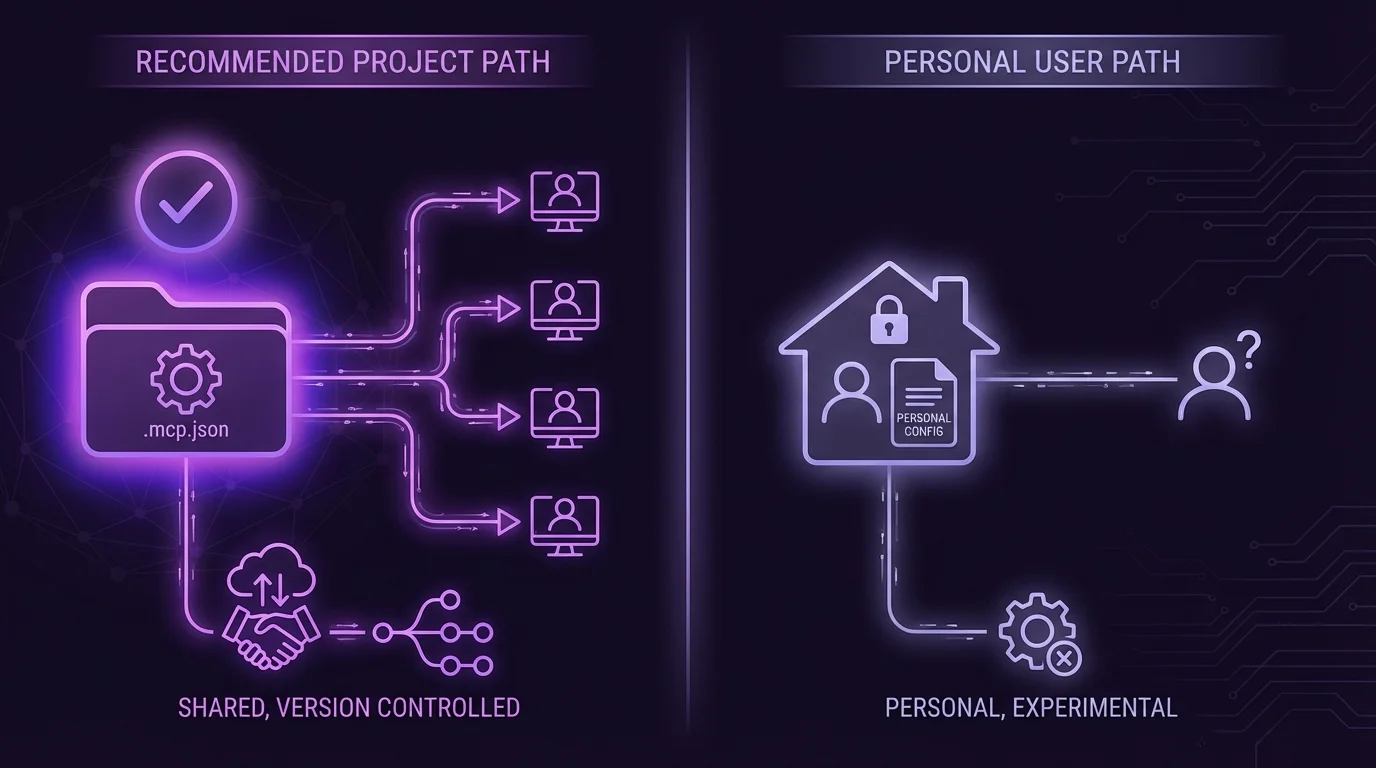
The Model Context Protocol (MCP) is Anthropic's standard for connecting Claude to external tools and data sources. The CCA-F tests your knowledge of MCP configuration at two levels:
Project-Level Configuration (.mcp.json):
- Located in the project root directory
- Shared via version control so all team members use the same tool configuration
- This is the standard location for team-wide MCP server definitions
- Contains server connection details, available tools, and authentication configuration
User-Level Configuration (~/.claude.json):
- Located in the user's home directory
- Personal to each developer, not shared via version control
- Use this for experimental servers, personal API keys, or development-only tools
- Should NOT contain team-wide configurations
Key configuration principles:
- Environment variable expansion is supported:
${GITHUB_TOKEN}in the config file resolves to the environment variable at runtime - Never commit secrets to
.mcp.json. Use environment variable references instead of literal tokens - MCP Resources expose content catalogs that agents can browse and retrieve. Resources are read-only data sources, distinct from tools which perform actions.
The exam will present scenarios where a developer puts personal configuration in the wrong file or commits secrets to version control. Knowing which file is for team use (.mcp.json) and which is for personal use (~/.claude.json) is essential.
MCP Server Types and Their Roles:
The CCA-F expects you to understand the different types of MCP servers and when each is appropriate:
- Stdio servers communicate through standard input/output streams. They run as child processes and are the most common type for local tool servers. Configuration specifies the command to launch the server.
- SSE (Server-Sent Events) servers communicate over HTTP. They are suitable for remote servers that multiple developers connect to. Configuration specifies a URL endpoint.
When to use each:
- Use stdio servers for local development tools, file system access, and tools that need to run on the developer's machine
- Use SSE servers for shared services, databases, APIs, and tools that run on remote infrastructure
The exam may present a scenario where a team wants to share a tool server across developers and ask which MCP server type to use. The answer is SSE, because stdio servers run locally and cannot be shared.
Structured Error Responses
Error Handling: A High-Value Exam Topic
How tools report errors back to the agent determines whether the agent can recover gracefully. The CCA-F tests a specific error classification framework:
Transient errors (timeout, service temporarily unavailable, rate limit exceeded):
- Set
isRetryable: truein the error response - The agent should attempt the tool call again after a brief delay
- These errors are not the agent's fault and may resolve on their own
Permanent errors (validation failures, business rule violations, permission denied, resource not found):
- Set
isRetryable: falsein the error response - The agent should NOT retry the same call. It must try a different approach or escalate.
- Retrying a validation error with the same parameters will always produce the same failure
Critical distinction: ALWAYS distinguish between an access failure and a valid empty result. If a database query returns no results, that is a successful query with an empty result set. If the database connection times out, that is an error. Conflating these prevents the agent from making correct decisions.
Returning an empty result as if it were a success when the tool actually failed to execute is one of the most dangerous anti-patterns. The agent will proceed as if no data exists when in reality the data was never retrieved.
Built-in Tools
Claude Code provides several built-in tools that the CCA-F expects you to know:
| Tool | Purpose | Key Detail |
|---|---|---|
| Grep | Search file contents for patterns | Uses regex patterns, ideal for finding specific code or text across files |
| Glob | Match file paths by pattern | Finds files by name pattern (e.g., **/*.py), does not read content |
| Edit | Targeted file modifications | Uses unique text matching to find and replace specific sections |
| Read | Read file contents | Returns file content with line numbers, used when you know the file path |
| Write | Create or overwrite files | Creates new files or completely replaces existing file content |
Key exam insight: The Edit tool requires a unique text anchor to identify the location of the change. If the text you want to replace appears multiple times in the file, Edit cannot determine which instance to modify. In that case, you fall back to Read + Write as a combined operation: read the full file, make your changes, and write the entire file back.
The exam may present scenarios where an Edit operation fails because the anchor text is not unique. The correct recovery is Read + Write, not attempting Edit with a longer anchor (though that could also work if a unique anchor exists).
Sample Scenario Questions for Domain 2
Scenario 1 - Tool Selection: "An agent has access to both search_orders and get_order_details. When a user says 'Can you check on my order from last week?', the agent calls get_order_details instead of search_orders. What is the most likely fix?"
- Answer: Improve the tool descriptions to clarify that
search_ordershandles lookups when the user provides partial/fuzzy information like time ranges, whileget_order_detailsrequires a specific order ID.
Scenario 2 - Tool Count: "A customer service agent has 22 tools covering billing, shipping, returns, account management, and product information. Tool selection accuracy has dropped to 60%. What is the best architectural change?"
- Answer: Split the agent into specialized subagents (billing agent, shipping agent, returns agent, etc.) with 4-5 tools each, coordinated by a hub agent that routes based on the customer's request.
Scenario 3 - MCP Configuration: "A developer adds their personal GitHub token directly to .mcp.json for the GitHub MCP server. What is wrong with this approach?"
- Answer: Secrets should never be committed to version-controlled files. Use environment variable expansion (
${GITHUB_TOKEN}) in.mcp.jsoninstead of the literal token value.
Scenario 4 - Error Handling: "A weather API tool returns {"temperature": null, "status": "ok"} when the API is down. The agent tells the user 'There is no temperature data available for your location.' What should change?"
- Answer: The tool should return a structured error with
isRetryable: truewhen the API is down, not a null value with a success status. The current behavior makes the agent believe no data exists rather than recognizing a temporary failure.
Domain 3: Claude Code Configuration & Workflows (20%)
Approximate question count: ~12 questions
Domain 3 tests your knowledge of how Claude Code is configured, customized, and integrated into development workflows. This includes the CLAUDE.md hierarchy, skills configuration, path-specific rules, the distinction between plan mode and direct execution, and CI/CD integration patterns.
This domain is highly practical. The exam presents configuration scenarios and asks you to identify the correct file location, the right configuration syntax, or the appropriate workflow mode. Candidates who have hands-on experience with Claude Code have a significant advantage here.
CLAUDE.md Hierarchy
The CLAUDE.md file is how you provide persistent instructions to Claude Code. The hierarchy determines scope and visibility:
CLAUDE.md Configuration Hierarchy
| Level | Location | Scope | Version Controlled? |
|---|---|---|---|
| User | ~/.claude/CLAUDE.md | Applies only to that specific user across all projects | NO - personal file |
| Project | .claude/CLAUDE.md | Applies to all team members working on this project | YES - committed to repo |
| Directory | subdirectory/CLAUDE.md | Applies only when working within that specific directory | YES - committed to repo |
The hierarchy works through inheritance and specificity:
- User-level instructions apply everywhere for that developer but are invisible to teammates
- Project-level instructions apply to everyone on the team and travel with the repository
- Directory-level instructions override or supplement project-level instructions but only within their scope
Resolution order: When Claude Code operates on a file, it loads CLAUDE.md files from most general (user) to most specific (directory), with more specific instructions taking precedence when there are conflicts.
Common configuration patterns:
- User-level: Personal preferences like preferred coding style, editor conventions, default language for responses. These are individual to each developer and should NOT affect team outputs.
- Project-level: Coding standards, architecture patterns, testing requirements, deployment procedures. These should be consistent across the team.
- Directory-level: Framework-specific instructions (e.g., React conventions in
/frontend, Django conventions in/backend), module-specific testing requirements, documentation standards for API directories.
What belongs in CLAUDE.md vs. system prompts: CLAUDE.md is for persistent, project-specific instructions. System prompts (sent via the API) are for session-specific or task-specific instructions. The exam tests whether you can distinguish between a configuration that should persist across all sessions (CLAUDE.md) and one that applies only to the current task (system prompt).
The Configuration Trap
One of the most common exam traps involves placing team instructions in user-level config. If a developer puts team coding standards in ~/.claude/CLAUDE.md instead of .claude/CLAUDE.md:
- Only that developer benefits from the instructions
- Other team members get inconsistent behavior from Claude Code
- The instructions are not version-controlled and can be lost
- New team members do not receive the instructions at all
When a question describes team-wide inconsistencies in Claude Code behavior, check whether the instructions are in the wrong configuration level. This is almost always the root cause.
Skills Configuration
Skills allow you to define reusable, parameterized workflows that Claude Code can execute. The CCA-F tests three key configuration properties:
context:fork - This is the most important skill configuration property for the exam:
- Runs the skill in an isolated sub-agent that has its own conversation context
- Prevents verbose output from polluting the main conversation
- The sub-agent completes its work and returns only the relevant results to the parent
- Use this for skills that produce a lot of intermediate output (like running test suites or analyzing large codebases)
allowed-tools - Restricts which tools are available during skill execution:
- A security and reliability mechanism that prevents skills from using tools they should not need
- For example, a "lint code" skill might only need Read and Grep, not Write or Bash
- Reducing the tool set also improves tool selection accuracy (connecting back to Domain 2's tool distribution concept)
argument-hint - Prompts the user for required parameters when the skill is invoked:
- Ensures the skill has all necessary information before execution begins
- Prevents the skill from guessing or asking mid-execution
- Example: a "deploy" skill might require an
argument-hintfor the target environment (staging, production)
Path-Specific Rules
For more granular control than directory-level CLAUDE.md files, Claude Code supports path-specific rules:
- Rules are defined in files within the
.claude/rules/directory - Each rule file contains YAML frontmatter with a
pathsfield that specifies glob patterns - The rule content only loads when editing files that match the glob patterns
- This allows you to have different coding standards for different parts of the codebase
Example use cases:
- Different formatting rules for frontend (
.tsx) vs. backend (.py) files - Stricter documentation requirements for API endpoint files
- Test-specific instructions that only activate when writing test files
The exam tests whether you know that these rules are conditional - they do not load for every interaction, only when the active file matches the pattern. A question might present a scenario where a rule is not being applied and ask you to diagnose why (answer: the file being edited does not match the glob pattern).
Path-specific rules vs. directory-level CLAUDE.md:
| Feature | Path-Specific Rules | Directory CLAUDE.md |
|---|---|---|
| Location | .claude/rules/ | Any subdirectory |
| Scope | Based on glob patterns in YAML frontmatter | Based on directory containment |
| Flexibility | Can target scattered files across the project | Only targets files within that directory |
| Use case | Cross-cutting concerns (all test files, all API routes) | Directory-specific standards |
Path-specific rules are more powerful because they can target files across the entire project tree using glob patterns, while directory-level CLAUDE.md is limited to files within its directory. However, directory-level CLAUDE.md is simpler and more intuitive for straightforward directory scoping.
The exam may present a scenario where a developer wants to apply rules to all *_test.py files regardless of where they are in the project. The answer is a path-specific rule in .claude/rules/, not CLAUDE.md files in every directory that contains tests.
Plan Mode vs. Direct Execution
Claude Code offers two operational modes, and knowing when to use each is a key exam topic:
Plan Mode is appropriate for:
- Large-scale multi-file changes that affect the architecture
- Situations where there are multiple valid approaches and you need to evaluate trade-offs
- Architectural decisions that have cascading effects throughout the codebase
- When you want Claude to outline its approach before making changes
- Complex refactoring that touches many files and modules
Direct Execution is appropriate for:
- Single-file changes with clear scope and minimal risk
- Clear stack trace fixes where the error message points directly to the problem
- Simple additions like adding a new function, endpoint, or test case
- When the correct approach is obvious and planning would add unnecessary overhead
The mental model: if you would want to review the plan before the agent starts working, use Plan Mode. If you would be comfortable letting the agent just fix it, use Direct Execution.
The decision matrix for mode selection:
| Scenario | Mode | Why |
|---|---|---|
| Fix a typo in a string literal | Direct Execution | Trivially scoped, zero ambiguity |
| Add a new database migration | Direct Execution | Well-understood pattern, single file |
| Refactor authentication across 15 files | Plan Mode | Multi-file, multiple valid approaches |
| Implement a new feature with unclear requirements | Plan Mode | Needs discussion of approach first |
| Fix a bug identified by a specific stack trace | Direct Execution | Error points directly to the problem |
| Migrate from one framework to another | Plan Mode | Architectural decision, cascading effects |
A common exam trap presents a multi-file change that seems complex but has only one valid approach (like renaming a variable across the codebase). This is actually better suited for Direct Execution because there is no design decision to make, despite the change touching many files. The deciding factor is whether there are meaningful alternatives to evaluate, not the number of files affected.
Permission Controls and Trust Levels
Claude Code has a permission system that controls which tools require explicit user approval. The CCA-F tests your understanding of this system:
- Read-only tools (Read, Grep, Glob) are generally allowed without explicit approval
- Write tools (Edit, Write, Bash) may require approval depending on the trust configuration
- Destructive operations (file deletion, git force push) always require explicit approval in default configurations
- The
--dangerously-skip-permissionsflag bypasses all permission checks and is intended only for CI/CD environments where no human is present
The exam tests whether you know that permission controls are a safety mechanism, not a debugging tool. If an agent is making incorrect changes, the fix is better prompting or tool design, not tighter permissions. Permissions prevent catastrophic errors; they do not improve decision quality.
CI/CD Integration
CI/CD Integration: Critical Flags and Patterns
Claude Code can be integrated into CI/CD pipelines for automated code review, test generation, and other tasks. The exam tests several specific integration patterns:
The -p (or --print) flag is essential for non-interactive mode:
- In a CI/CD pipeline, there is no human to interact with the terminal
- Without
-p, Claude Code will wait for interactive input, causing the pipeline to hang indefinitely - This is the most common CI/CD integration mistake and a frequent exam question
--output-format json combined with --json-schema enables machine-parseable output:
- CI/CD systems need structured data, not human-readable text
- The JSON schema ensures the output conforms to a specific structure that downstream tools can parse
- Use this for generating reports, extracting metrics, or feeding results into other pipeline stages
Review session best practices:
- When running automated code reviews, include prior review findings in the prompt so the agent focuses on new or unaddressed issues rather than re-reporting known problems
- Report only new or unaddressed issues to avoid noise in the CI/CD output
- Independent review sessions are better than self-review: When the same model generates code and then reviews it, it retains its reasoning context and is biased toward finding its own code correct. Use a separate, independent instance for review.
Sample Scenario Questions for Domain 3
Scenario 1 - Configuration Level: "A team lead puts coding standards in ~/.claude/CLAUDE.md. Three months later, new hires produce code that violates the standards. What is the most likely cause?"
- Answer: The standards are in user-level config, not project-level. New hires do not have the same ~/.claude/CLAUDE.md file.
Scenario 2 - Plan Mode: "A developer needs to add a single field to an existing API response. Which mode should they use?"
- Answer: Direct Execution. This is a simple, well-scoped change.
Scenario 3 - CI/CD: "A code review pipeline using Claude Code hangs during execution. The pipeline script runs claude review-changes. What is the most likely fix?"
- Answer: Add the
-pflag for non-interactive mode.
Scenario 4 - Skills Configuration: "A developer creates a skill that runs a comprehensive test suite. The test output floods the main conversation with hundreds of lines of test results, making it difficult to continue working. What configuration property should they add?"
- Answer: Add
context:forkto the skill configuration. This runs the skill in an isolated sub-agent that processes the verbose test output internally and returns only the relevant summary to the main conversation.
Scenario 5 - Path-Specific Rules: "A team wants different commenting standards for their API route handlers (/src/routes/*.ts) vs. their utility functions (/src/utils/*.ts). Where should they configure this?"
- Answer: Create two rule files in
.claude/rules/with YAML frontmatter specifying the appropriate glob patterns. One file targetssrc/routes/*.tsand the other targetssrc/utils/*.ts. Directory-level CLAUDE.md files would also work but are less precise if the directories contain other file types.
Domain 3 Key Terminology Quick Reference
| Term | Definition | Exam Relevance |
|---|---|---|
| CLAUDE.md | Persistent instruction file for Claude Code | Three-level hierarchy is heavily tested |
| context:fork | Skill property for isolated sub-agent execution | Prevents output pollution |
| allowed-tools | Skill property restricting available tools | Security and accuracy mechanism |
| -p / --print | Non-interactive mode flag | Essential for CI/CD, prevents hanging |
| Plan Mode | Outline approach before execution | For multi-file, multi-approach changes |
| Direct Execution | Execute immediately without planning | For clear, well-scoped changes |
| .claude/rules/ | Directory for path-specific rule files | Conditional loading based on glob patterns |
Domain 4: Prompt Engineering & Structured Output (20%)
Approximate question count: ~12 questions
Domain 4 covers the art and science of crafting effective prompts, extracting structured data from unstructured sources, implementing validation loops, using the Batch API, and designing multi-instance review workflows. This domain tests both theoretical knowledge and practical judgment about when different techniques are appropriate.
The key theme across Domain 4 is precision over vagueness. The exam consistently rewards specific, concrete approaches and penalizes generic advice like "write better prompts."
Explicit Criteria Over Vague Guidance
This is the foundational principle of Domain 4 and one of the most heavily tested concepts:
"Be conservative" does NOT reduce false positives.
Telling a model to "be conservative" or "be careful" or "only flag real issues" provides no actionable guidance. The model has no objective definition of "conservative" to work with, so it applies its own interpretation, which varies between invocations.
Instead, you must define explicit criteria with concrete examples:
- Bad: "Flag potential security issues, be conservative"
- Good: "Flag SQL injection: any string concatenation in SQL queries using user-provided input. Flag XSS: any direct insertion of request parameters into HTML response without escaping. Do NOT flag: parameterized queries, sanitized inputs, static strings."
The explicit version tells the model exactly what constitutes a finding, including what NOT to flag. This eliminates the ambiguity that causes both false positives and false negatives.
Expect multiple questions that present vague prompts and ask which revision would most effectively solve a specific problem (too many false positives, missed findings, inconsistent output). The answer always involves making criteria more explicit and concrete.
The explicit criteria framework:
For any classification or detection task, your prompt should specify:
- What to flag: Precise definition with concrete examples
- What NOT to flag: Acceptable patterns that look similar but are not issues
- Severity classification: How to distinguish critical from minor findings
- Output format: Exact structure for each finding (location, type, severity, recommendation)
- Confidence threshold: When to report vs. when to skip a borderline case
This framework eliminates the ambiguity that causes inconsistent outputs. When two different invocations of the same prompt produce different results for the same input, the problem is almost always that the criteria are not explicit enough.
The "be conservative" trap appears in multiple forms:
- "Be thorough but don't over-report" (contradictory without explicit thresholds)
- "Use good judgment" (the model has no shared reference for what "good" means)
- "Flag only significant issues" (what makes an issue "significant"?)
- "Be accurate" (this is always the goal, stating it adds nothing)
Each of these is effectively a no-op instruction. The model will behave the same whether you include it or not, because it provides no actionable guidance.
Few-Shot Prompting
Few-shot prompting is one of the most powerful techniques for controlling Claude's output, and the CCA-F tests it in detail:
Optimal number of examples: 2-4 targeted examples. More than 4 examples consume context window space without proportional improvement. Fewer than 2 may not establish the pattern clearly enough.
What to include in each example:
- The reasoning behind the choice, not just the input-output pair. Show the model why this example is correct, not just that it is correct.
- The desired output format: location, issue type, severity level, recommended fix. Be explicit about the format you want.
- Acceptable patterns alongside genuine issues: Show examples where something looks like a problem but is actually fine. This is crucial for reducing false positives.
Example structure:
Example 1:
Input: [code snippet with SQL injection]
Output: {location: "line 47", issue: "SQL injection", severity: "critical", fix: "Use parameterized query"}
Reasoning: String concatenation with user input in SQL query creates injection vulnerability.

Example 2:
Input: [code snippet with parameterized query]
Output: No issues found.
Reasoning: This query uses parameterized inputs, which is the correct pattern. Not a finding.
The second example is just as important as the first. It teaches the model what NOT to flag, which directly reduces false positives.
Common few-shot mistakes tested on the exam:
- Too many examples (8+): Consumes too much context window without proportional benefit. The model learns the pattern from 2-4 examples; additional examples add noise.
- Examples without reasoning: Input-output pairs alone teach the format but not the decision logic. Including reasoning teaches the model why a particular output is correct.
- Only positive examples: Showing only true findings without any "not a finding" examples teaches the model to flag everything. Negative examples are essential for calibration.
- Examples that are too similar: If all examples involve the same type of issue, the model may overfit to that specific pattern and miss other issue types.
When to use few-shot vs. zero-shot:
| Situation | Approach | Rationale |
|---|---|---|
| Model already handles the task well | Zero-shot | Examples add unnecessary tokens |
| Output format is not matching expectations | Few-shot (1-2 examples) | Format examples are highly effective |
| Complex judgment calls with edge cases | Few-shot (3-4 examples) | Examples establish decision boundaries |
| Simple classification with clear categories | Zero-shot with explicit criteria | Categories are better defined in criteria than examples |
Structured Output via tool_use
JSON Schemas: What They Fix and What They Don't
Structured output using tool_use with JSON schemas is a powerful technique, but the exam tests a critical limitation:
JSON schemas eliminate syntax errors but NOT semantic errors.
A schema ensures the output is valid JSON with the correct field names and types. It does NOT ensure the values in those fields are correct. If you ask for a customer's email and the model hallucinates a plausible-looking email address, the schema will happily accept it because the format is correct.
Key design patterns for robust schemas:
- Nullable fields for information that may not exist in the source. If a document might not contain a phone number, make the field nullable rather than forcing the model to invent one.
- "unclear" enum values for cases where the model cannot determine the correct classification with confidence. Including "unclear" as a valid option gives the model an honest escape path instead of forcing it to guess.
- "other" + detail string patterns for classification tasks where the predefined categories may not cover every case. An "other" option with a freetext "otherDetail" field captures edge cases without forcing incorrect classification.
These patterns reduce hallucination by giving the model honest alternatives to making things up.
Validation & Retry Loops
When structured extraction fails validation, a retry loop can recover the correct output. The CCA-F tests your knowledge of when retries work and when they do not:
How the retry loop works:
- Send the original document to Claude for extraction
- Validate the extracted output against your schema and business rules
- If validation fails, send back: the original document + the failed extraction + the specific validation errors
- Claude uses the error feedback to correct its extraction
What retries fix:
- Format mismatches: The model extracted data in the wrong format (date as "March 5" instead of "2026-03-05")
- Structural errors: The model put data in the wrong field or missed a required field that exists in the source
What retries do NOT fix:
- Absent information: If the source document simply does not contain the requested data, no amount of retrying will produce it. The model will either return null (correct) or hallucinate a value (incorrect). A retry loop cannot help because the information does not exist.
This distinction is critical. When a question describes a retry loop that keeps failing, check whether the information actually exists in the source material. If it does not, the correct answer is to make the field nullable, not to add more retries.
The retry loop decision tree:
- Did the extraction fail validation? If no, extraction is successful.
- Is the required data present in the source document? If no, make the field nullable.
- Is the error a format mismatch or structural issue? If yes, retry with the original document + failed extraction + specific validation errors.
- Has the retry count exceeded the maximum (typically 2-3 retries)? If yes, flag for human review.
Retry budgets: The CCA-F assumes a practical limit of 2-3 retries for extraction tasks. Each retry consumes tokens and time, so unlimited retries are wasteful. If the extraction has not succeeded after 3 attempts, the problem is likely in the prompt design or the source material, not in the specific extraction attempt.
Prompt Chaining and Decomposition
A less frequently tested but still relevant topic in Domain 4 is prompt chaining: breaking a complex task into a sequence of simpler prompts where each step's output feeds into the next step's input.
When to use prompt chaining:
- The task requires multiple distinct reasoning steps
- Each step produces intermediate results that the next step needs
- A single monolithic prompt would exceed the model's reliable performance range for complexity
Example chain for document analysis:
- Step 1: Extract all entities from the document (names, dates, amounts)
- Step 2: Classify each entity by type and relevance
- Step 3: Cross-reference entities against known records
- Step 4: Generate a summary of findings with citations
Each step is simpler than asking the model to do everything at once, and each step can be validated independently before passing results to the next step.
The trade-off: Prompt chaining increases total token usage and latency because each step is a separate API call. Use it when single-prompt complexity causes errors, not as a default for every task.
Batch API Constraints

The Batch API offers significant cost savings but comes with important trade-offs. The CCA-F tests this comparison:
Batch API vs. Real-Time API
| Characteristic | Batch API | Real-Time API |
|---|---|---|
| Cost | 50% cost savings | Standard pricing |
| Processing time | Up to 24-hour processing window | Immediate response (seconds) |
| Latency guarantee | No guaranteed latency SLA | Low latency, predictable response times |
| Multi-turn tool calling | NOT supported | Fully supported |
| Request correlation | Uses custom_id for request/response matching | Direct request/response pairing |
| Best for | Large-scale processing, classification, extraction | Interactive use, agentic workflows, tool use |
Key exam points about the Batch API:
- The 50% cost savings is the primary motivation for using the Batch API
- The up to 24-hour processing window means you cannot use it for real-time applications
- No multi-turn tool calling is the most important limitation. Agentic workflows that require tool use and iteration cannot use the Batch API. This is a frequent exam trap: presenting a scenario that sounds like a good Batch API candidate but requires tool calling.
custom_idis how you match requests to responses. Each request in a batch includes a custom_id, and the corresponding response includes the same custom_id. Without this, you cannot correlate which response belongs to which request.
Multi-Instance Review
The CCA-F tests your understanding of why and how to use multiple Claude instances for review workflows:
The core problem: When the same model instance generates content and then reviews it, the model retains its reasoning context from the generation phase. It is biased toward finding its own output correct because it remembers why it made each decision.
The solution: Use independent review instances that do not have access to the generator's reasoning context. The reviewer sees only the output, not the rationale behind it, enabling more objective evaluation.
Recommended review architecture:
- Per-file passes for identifying local issues within individual files (syntax errors, style violations, logic bugs within a single function)
- Cross-file integration pass for identifying issues that span multiple files (inconsistent interfaces, missing imports, broken contracts between modules)
This two-pass approach is more thorough than a single holistic review because it ensures both local and global issues are caught. The exam may present a scenario where a review process misses cross-file integration issues and ask for the improvement. The answer is adding an integration pass, not making the per-file reviews more thorough.
Why self-review fails and independent review works:
The fundamental problem with self-review is confirmation bias at the reasoning level. When the model generates code, it constructs an internal reasoning chain that justifies each decision. When the same model reviews that code, those reasoning chains are still active in the context. The model effectively reviews its own justifications rather than evaluating the code from a fresh perspective.
An independent review instance sees only the code, not the reasoning behind it. It evaluates the code on its own merits, which surfaces issues that the generator was blind to because it was focused on its original intent rather than the actual output.
Practical implementation:
- For automated pipelines, create a separate API call for the review step with a fresh conversation context
- Do NOT pass the generator's internal reasoning or chain-of-thought to the reviewer
- DO pass the original requirements so the reviewer can check whether the code meets them
- Pass relevant linting or testing output so the reviewer can incorporate automated findings
Sample Scenario Questions for Domain 4
Scenario 1 - Explicit Criteria: "A code review agent produces too many false positives when flagging security issues. The system prompt says 'Be thorough but conservative in flagging potential security vulnerabilities.' What is the best improvement?"
- Answer: Replace the vague guidance with explicit criteria defining what constitutes each type of security vulnerability, including examples of acceptable patterns.
Scenario 2 - Batch API: "A company wants to classify 100,000 customer support tickets using Claude. Each ticket requires multiple tool calls to look up customer context. Can they use the Batch API?"
- Answer: No. The Batch API does not support multi-turn tool calling. They must use the real-time API, though they can parallelize requests.
Scenario 3 - Retry Loop: "An extraction pipeline retries three times trying to extract a phone number from a business document. The document does not contain a phone number. What should be changed?"
- Answer: Make the phone number field nullable. The retry loop cannot extract information that does not exist.
Master These Concepts with Practice
Our CCA-F practice bundle includes:
- 6 full practice exams (390+ questions)
- Detailed explanations for every answer
- Domain-by-domain performance tracking
30-day money-back guarantee
Domain 5: Context Management & Reliability (15%)
Approximate question count: ~9 questions
Domain 5 is the smallest domain by weight but arguably the most nuanced. It tests your understanding of how context windows work in practice, what happens when they fill up, how to manage long-running sessions, and how to build reliable systems that recover from failures and maintain accuracy.
The themes here connect directly to real-world production challenges: context degradation over long conversations, the lost-in-the-middle effect, error propagation, crash recovery, and the critical importance of human review even for highly accurate systems.
Lost-in-the-Middle Effect

This is the most important concept in Domain 5 and one of the most frequently tested topics on the entire exam:
Models process information at the beginning and end of the context window well, but tend to omit or underweight findings from middle sections.
This is not a theoretical concern. In practice, if you send a 50-page document for analysis, findings from pages 1-5 and pages 45-50 will be reliably captured, but findings from pages 20-30 may be missed or given less attention. This has significant implications for system design.
Mitigation strategies:
-
Extract transactional facts into a persistent "case facts" block: Rather than keeping raw conversation history, periodically extract key facts and decisions into a structured summary that stays at the beginning of the context.
-
Trim verbose tool outputs to relevant fields only: If a tool returns 200 lines of JSON but only 5 fields are relevant, trim the output before adding it to the conversation. Less noise means the model has fewer middle sections to lose track of.
-
Place key findings summaries at the input beginning: When the context is getting long, put the most important information at the top. Summaries of previous findings should be prepended, not appended, to the conversation.
The exam will present scenarios where an agent misses information and ask for the diagnosis. If the missed information is in the middle of a long context, the lost-in-the-middle effect is the answer, and the fix involves restructuring where information is placed.
Advanced mitigation: document chunking for analysis tasks.
When analyzing long documents, rather than sending the entire document at once, break it into overlapping chunks and process each independently:
- Split the document into sections of manageable size (e.g., 10-15 pages each)
- Include overlapping content between chunks to prevent missing findings at chunk boundaries
- Process each chunk independently as a separate analysis task
- Merge findings from all chunks, deduplicating any findings from overlapping regions
This approach eliminates the lost-in-the-middle effect entirely because each chunk is short enough that the model can process it fully. The trade-off is increased total token usage and the need for a merge step.
Context window budgeting:
A related concept is managing the context window as a limited resource:
| Content Type | Priority | Action |
|---|---|---|
| System instructions | Highest | Always at the beginning, never trimmed |
| Current task description | High | Present in every iteration |
| Key findings from prior steps | High | Summarized and placed near the beginning |
| Recent tool results | Medium | Include most recent, summarize older |
| Historical conversation | Low | Trim or summarize aggressively |
| Verbose tool output | Lowest | Extract only relevant fields |
The model allocates attention roughly proportional to position (beginning and end get more attention) and relevance. By placing high-priority content at the beginning and trimming low-priority content aggressively, you maximize the model's ability to use the information it has.
Escalation Patterns (Revisited)
Domain 5 revisits escalation from a reliability perspective (Domain 1 covers it from an architectural perspective). The key points are reinforced:
When to escalate:
- Customer explicitly requests human assistance
- Policy is ambiguous and agent lacks clear guidance
- Agent has made multiple attempts without progress toward resolution
When NOT to escalate:
- Not based on sentiment alone. This bears repeating because the exam tests it from multiple angles across domains. A customer expressing frustration about a billing error does not need escalation if the agent has the tools and authority to fix the billing error.
- Not based on self-reported confidence. Self-reported confidence scores are poorly calibrated. The model's internal assessment of its own certainty does not reliably predict accuracy.
The reliability angle adds a new dimension: escalation is a safety mechanism that protects the customer when the agent's capabilities are genuinely exceeded. Over-escalation is a reliability failure because it means the system is not performing the work it was designed to handle.
Error Propagation
Error Propagation: Silent Failures Kill Reliability
How errors propagate through an agentic system determines whether failures are recoverable or catastrophic. The CCA-F tests a specific principle:
Return structured error context, not generic failure statuses.
A tool that returns {"status": "error"} gives the agent nothing to work with. It knows something went wrong but not what, why, or what to do about it.
A well-structured error response includes:
- Failure type: What category of error occurred (timeout, validation, permission, not found)
- What was attempted: The specific action that failed, so the agent knows what did not work
- Partial results: Any data that was successfully retrieved before the failure
- Alternatives: Suggested alternative approaches the agent could try
The most dangerous anti-pattern: Silently returning empty results as success.
If a database query fails due to a connection timeout and the tool returns {"results": [], "status": "success"}, the agent concludes that no matching records exist. It will proceed with incorrect assumptions, potentially making decisions based on the belief that data does not exist when in reality the data was never retrieved.
This is worse than returning an error because the agent has no signal that something went wrong. It will confidently produce incorrect results.
Context Degradation
Extended sessions cause context degradation, where the model begins to produce lower-quality outputs due to the accumulated weight of a long conversation history. The CCA-F tests the symptoms and solutions:
Symptoms of context degradation:
- The model gives inconsistent answers to similar questions asked at different points in the conversation
- The model starts referencing "typical patterns" or making generic suggestions instead of engaging with the specific context
- The model forgets or contradicts earlier decisions made in the same session
- Quality of analysis visibly declines compared to the beginning of the session
Solutions for context degradation:
-
Scratchpad files: Write important findings and decisions to a file that persists outside the conversation context. The agent can read this file to refresh its memory without relying on conversation history.
-
Spawn subagents: Delegate specific tasks to fresh subagents that start with clean context. The subagent is not burdened by the parent's long conversation history and can focus entirely on its assigned task.
-
/compact: This command compresses the conversation history, removing redundant information while preserving key facts. It is the most direct intervention for context degradation in Claude Code.
The exam may present a scenario where an agent in a long session starts producing inconsistent results. The correct diagnosis is context degradation, and the fix involves one of the three solutions above (depending on the specific scenario details).
Crash Recovery
Production agentic systems must handle crashes gracefully. The CCA-F tests a specific recovery pattern:
State export to manifest files:
- The agent periodically exports its state to a manifest file that captures current progress, completed steps, pending tasks, and any intermediate results
- If the agent crashes and restarts, the coordinator loads the manifest file on resume
- The coordinator injects the saved state into prompts so the agent can continue from where it left off rather than starting over
This pattern is analogous to database transaction logs or checkpoint files in distributed systems. The manifest file is the source of truth for recovery, not the conversation history (which may be lost in a crash).
Key exam point: the coordinator is responsible for loading the manifest and injecting it into prompts. The agent does not automatically resume from a manifest. This is an active recovery process that must be implemented.
What the manifest file should contain:
| Field | Purpose | Example |
|---|---|---|
| completed_steps | Which tasks are finished | ["data_extraction", "validation"] |
| pending_steps | Which tasks remain | ["classification", "summary"] |
| intermediate_results | Key findings so far | Extracted entities, partial analysis |
| current_step_progress | How far into the current task | "Processed 45 of 120 records" |
| error_history | What has failed and why | Previous error messages and recovery attempts |
The manifest should be written atomically (write to a temp file, then rename) to prevent corruption if a crash occurs during the write operation itself. A half-written manifest is worse than no manifest because it may contain inconsistent state.
Idempotency in Agentic Systems
A concept closely related to crash recovery that the CCA-F tests is idempotency: the ability to safely re-execute an operation without causing unintended side effects.
Why idempotency matters for agents:
- After a crash, the coordinator resumes from the manifest and may re-execute the last incomplete step
- If that step is not idempotent (e.g., "transfer $500 to account X"), re-execution could cause a double transfer
- Idempotent operations (e.g., "set balance to $1,500") produce the same result regardless of how many times they are executed
Strategies for achieving idempotency:
- Use idempotent API calls where possible (PUT over POST, upsert over insert)
- Include a unique request ID that downstream systems can use for deduplication
- Check whether a step has already been completed before executing it (using the manifest)
The exam tests this through scenarios where a crashed agent resumes and causes duplicate operations. The fix is always making the operations idempotent, not preventing crashes (which are inevitable in production).
Human Review & Provenance
Even highly accurate AI systems require human review, and the CCA-F tests your understanding of why and how:
The accuracy paradox: A system with 97% overall accuracy sounds impressive, but that aggregate number masks poor performance on specific types of inputs. The system might be 99.9% accurate on common cases and only 80% accurate on rare but important edge cases.
The solution: stratified random sampling.
- Do not sample uniformly across all outputs
- Sample by document type AND field segment to ensure you are testing performance across all categories
- This reveals pockets of poor performance that random sampling would miss
- For example, a document extraction system might be excellent at extracting names and dates but poor at extracting complex legal clauses. Uniform sampling would under-represent the legal clause failures.
Claim-source mappings for provenance: When the agent cites information, the citation should include:
- URL: Where the information was found
- Document name: Which specific document contained the claim
- Excerpt: The relevant text that supports the claim
- Date: When the source was accessed or published
This provenance trail allows human reviewers to verify claims efficiently without needing to search for the source themselves.
Designing effective human review workflows:
Not all outputs require the same level of review. The CCA-F expects you to understand how to prioritize review effort:
- High-risk outputs (financial decisions, legal interpretations, medical recommendations): Mandatory human review before action
- Medium-risk outputs (customer communications, data classifications): Sampled review with escalation paths
- Low-risk outputs (internal summaries, code formatting): Spot-checked periodically
The key insight is that review is a cost-benefit analysis. Reviewing every output is expensive and slows throughput. Not reviewing any output risks catastrophic errors. The correct approach is stratified sampling that concentrates review effort on high-risk categories and edge cases.
The calibration problem in detail:
Why does 97% accuracy mask poor performance? Consider an extraction system processing 1,000 documents:
- 800 common documents (invoices, receipts): 99.5% accuracy = 4 errors
- 150 moderate documents (contracts, reports): 95% accuracy = 7-8 errors
- 50 complex documents (legal filings, regulatory forms): 80% accuracy = 10 errors
Overall: 978 correct out of 1,000 = 97.8% accuracy. But the 50 complex documents have a 20% error rate, which is unacceptable for legal or regulatory content. Uniform random sampling with a sample size of 50 would likely draw mostly common documents and miss the problem entirely. Stratified sampling ensures all three categories are represented.
Sample Scenario Questions for Domain 5
Scenario 1 - Lost-in-the-Middle: "An agent analyzes a 100-page contract and consistently misses clauses in the middle third of the document. What is the most likely cause and best mitigation?"
- Answer: Lost-in-the-middle effect. Restructure the input to break the document into sections processed individually, or extract key clauses into a summary block placed at the beginning.
Scenario 2 - Context Degradation: "After a 3-hour debugging session, Claude Code starts suggesting generic solutions that do not account for the specific codebase patterns established earlier in the session. What should the developer do?"
- Answer: Use
/compactto compress the conversation history, or spawn a fresh subagent for the current task with a clean context and explicit summary of relevant findings.
Scenario 3 - Silent Failure: "A tool returns an empty array when the database connection times out. The agent concludes no matching records exist and proceeds. What should be changed?"
- Answer: The tool must distinguish between a successful query with no results and a failed query. Connection timeouts should return an error response, not an empty success.
Study Priority Matrix
Understanding how to allocate your study time requires considering both domain weight and difficulty level. Some domains are straightforward to learn but carry heavy weight, while others are conceptually challenging but contribute fewer questions.
Study Priority Matrix
| Domain | Weight | Difficulty | Recommended Study Hours (30-day plan) | Priority |
|---|---|---|---|---|
| 1: Agentic Architecture | 27% | High | 25-30 hours | Highest |
| 2: Tool Design & MCP | 18% | Medium | 15-18 hours | Medium |
| 3: Claude Code Config | 20% | Medium-Low | 15-20 hours | High |
| 4: Prompt Engineering | 20% | Medium-High | 18-22 hours | High |
| 5: Context Management | 15% | High | 12-15 hours | Medium |
Explanation of the priority assignments:
-
Domain 1 gets the highest priority because it has both the highest weight (27%) and high difficulty. Agentic architecture concepts are unfamiliar to many developers and require significant practice to internalize.
-
Domain 3 gets high priority despite medium-low difficulty because it carries 20% weight and the questions tend to be straightforward if you know the configuration details. This is where dedicated memorization pays off quickly.
-
Domain 4 gets high priority because prompt engineering at the CCA-F level goes well beyond basic prompting. The concepts around explicit criteria, validation loops, and multi-instance review require careful study.
-
Domain 2 gets medium priority because many of the concepts (tool design, error handling) will be familiar to experienced developers. Focus on MCP-specific configuration and the tool_choice options.
-
Domain 5 gets medium priority because while the concepts are sophisticated, there are fewer questions (9) and many of the escalation/error propagation topics overlap with Domains 1 and 2.
How Domains Interconnect
The CCA-F does not test domains in isolation. Many questions require you to synthesize knowledge from multiple domains to arrive at the correct answer. Understanding these connections gives you an advantage.
Domain 1 + Domain 2: Agents Need Tools
Agentic architecture (Domain 1) is meaningless without tools (Domain 2). Questions may present an agent that is failing and require you to identify whether the problem is architectural (wrong orchestration pattern) or tool-related (poor descriptions, too many tools, wrong tool_choice). The diagnostic process requires knowledge from both domains.
Example cross-domain question: "A hub-and-spoke coordinator dispatches tasks to three subagents. SubAgent B consistently calls the wrong tool. What is the most likely cause?"
- You need Domain 1 knowledge to understand the hub-and-spoke pattern
- You need Domain 2 knowledge to identify that SubAgent B likely has too many tools or ambiguous tool descriptions
Domain 1 + Domain 5: Long-Running Agents Degrade
Agentic systems (Domain 1) that run for extended periods suffer from context degradation (Domain 5). Questions may require you to diagnose why an agent that worked well initially starts failing after many iterations.
Example: "An agentic code review system processes 200 files sequentially. Quality is excellent for the first 50 files but deteriorates significantly for files 100-200. What is happening?"
- Domain 1 tells you the agentic loop is correctly structured
- Domain 5 tells you the context window is filling up with accumulated review history
Domain 3 + Domain 4: Configuration Shapes Prompt Behavior
CLAUDE.md instructions (Domain 3) are themselves prompts (Domain 4). The quality of your CLAUDE.md content determines the quality of Claude Code's behavior. Questions may test whether a problem should be solved at the configuration level or the prompting level.
Domain 2 + Domain 5: Tool Errors Affect Reliability
Tool error handling (Domain 2) directly impacts system reliability (Domain 5). Poor error responses from tools cause cascading failures in the agent, which is a reliability concern. The structured error response patterns from Domain 2 are reliability patterns from Domain 5's perspective.
Domain 4 + Domain 5: Output Quality Requires Human Verification
Prompt engineering (Domain 4) can optimize output quality, but Domain 5 teaches that even optimized outputs require human review through stratified sampling. No amount of prompt engineering eliminates the need for verification, especially for high-stakes use cases.
Domain 1 + Domain 3: Architecture Meets Configuration
The agentic patterns from Domain 1 are implemented through Claude Code's configuration (Domain 3). The hub-and-spoke pattern uses skills with context:fork to create isolated subagents. Plan Mode decisions affect how the coordinator breaks down tasks. CLAUDE.md instructions shape how agents interpret their roles.
Example: "A coordinator agent keeps generating overly verbose responses that fill the context window. The coordinator is defined as a Claude Code skill. What configuration change would help?"
- Domain 1 tells you verbose coordinator output is a context management concern
- Domain 3 tells you the
context:forkskill property isolates verbose output from the main conversation
Domain 2 + Domain 4: Tools Shape Prompt Design
The tools available to an agent (Domain 2) determine what prompts need to accomplish (Domain 4). If a tool returns raw, unstructured data, the prompt must do more work to extract useful information. If tools return clean, structured data, prompts can focus on decision-making rather than data parsing.
Example: "An agent's prompts include extensive instructions for parsing JSON responses from tools. What is the better approach?"
- Domain 2 says the tool should return structured data in a consistent format
- Domain 4 says the prompt should focus on decision logic, not data parsing
Domain 3 + Domain 5: Configuration Prevents Reliability Issues
Proper Claude Code configuration (Domain 3) can prevent many of the reliability issues described in Domain 5. Path-specific rules reduce errors in specialized code areas. Skills with context:fork prevent context pollution. The /compact command is a Domain 3 feature that directly addresses a Domain 5 problem.
Key Cross-Domain Principles
Several principles apply across all five domains:
- Specificity beats generality: Specific tool descriptions (D2), explicit prompt criteria (D4), precise CLAUDE.md instructions (D3), concrete escalation rules (D1/D5)
- Programmatic enforcement beats probabilistic guidance: Hooks and gates (D1), schema validation (D4), permission controls (D3), structured errors (D2/D5)
- Isolation improves reliability: Subagent context isolation (D1),
context:fork(D3), independent review instances (D4), scratchpad files for state (D5) - Structured data beats unstructured data:
stop_reasonover text parsing (D1),tool_useschemas (D4), structured error responses (D2), manifest files (D5)
These cross-cutting principles are the strongest foundation for answering synthesis questions. When in doubt, the answer that is more specific, more programmatic, more isolated, and more structured is usually correct.
Common Questions
Putting It All Together: Your Domain Mastery Checklist
Use this checklist to track your progress across all five domains. Each item represents a concept or skill that you should be able to explain confidently before sitting for the exam.
CCA-F Domain Mastery Checklist
0/20 completedConclusion
The CCA-F exam is not a test of Claude trivia. It is a structured assessment of whether you can architect, configure, and maintain production-grade agentic systems using Claude. Each of the five domains tests a different facet of this skill set, and the weight distribution tells you exactly where the exam places the most value.
Domain 1 (Agentic Architecture, 27%) is your foundation. Master the agentic loop, the hub-and-spoke pattern, programmatic enforcement, and escalation logic. This single domain determines more than a quarter of your score.
Domains 3 and 4 (Claude Code Configuration and Prompt Engineering, 20% each) are your middle ground. Configuration knowledge is highly memorizable and rewards dedicated study. Prompt engineering at the CCA-F level goes beyond basics into explicit criteria, validation loops, and multi-instance review patterns.
Domain 2 (Tool Design & MCP, 18%) tests practical integration skills. Tool descriptions, tool_choice options, MCP configuration files, and structured error responses are all concrete, testable topics.
Domain 5 (Context Management & Reliability, 15%) ties everything together with production reality. Lost-in-the-middle, context degradation, crash recovery, and human review are the concepts that separate developers who have built real systems from those who have only studied theory.
Your study plan should reflect these weights. Allocate time proportionally, start with Domain 1, and use the interconnections between domains to reinforce your understanding. The CCA-F 30-Day Study Plan provides a day-by-day schedule that follows this priority matrix.
The four concepts most likely to determine your pass/fail result:
- Agentic loop control via
stop_reason(Domain 1) - This appears directly or indirectly in the largest number of questions - Tool descriptions as the primary selection mechanism (Domain 2) - The most common root cause of agent failures on the exam
- Programmatic enforcement vs. prompt-based guidance (Domain 1/3) - The most important design principle across the entire exam
- Lost-in-the-middle mitigation (Domain 5) - The most frequently tested reliability concept
If you can explain these four concepts confidently and apply them to novel scenarios, you have covered the highest-value material on the exam. Build outward from there to cover the remaining topics.
Your recommended next steps:
- Review the CCA-F exam format and structure to understand how questions are presented
- Create a 30-day study plan that allocates time according to the weight distribution above
- Use the CCA-F cheat sheet as a quick reference during your review sessions
- Practice with scenario-based questions that mirror the exam's difficulty and format
- Read our guide on how to pass the CCA-F on your first attempt for exam day strategies
Ready to start practicing? Explore our CCA-F practice exams for scenario-based questions across all five domains, designed to mirror the difficulty and format of the actual exam.
Sources:
Ready to Pass the CCA-F Exam?
Join thousands who passed with Preporato practice tests